Skip to content
Greatest Appliances

Best Full-Size Keyboards with Number Pad of 2026

Researched and compared full-size keyboards with number pads for data entry, typing, and everyday office use — covering switch feel, build quality, wired and wireless connectivity, keycap material, and value.

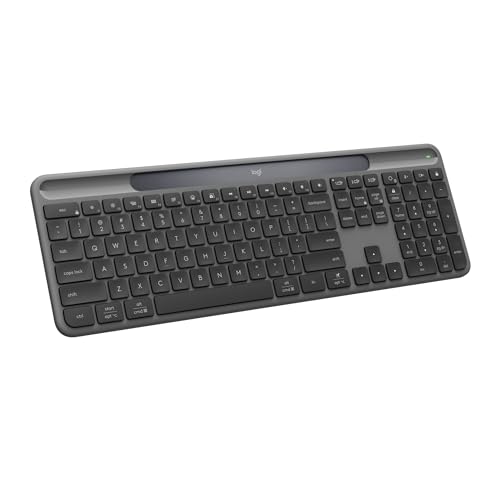
  1. Logitech Signature Slim Solar+ K980

    Top pickSolar-Powered Full-Size Keyboard

    Logitech Signature Slim Solar+ K980

    A strong choice for data entry, office work, and anyone who needs a dedicated number pad on their desk.

    Pros

    • Reliable always-on charging — stays powered by sunlight or indoor lighting
    • Full-size convenience with number pad boosts productivity for office and finance work
    • Long-lasting: up to 10 years battery life and high keystroke durability reduce replacement needs

    Cons

    • No wired connection option — Bluetooth only for wireless use
    • Single finish (Graphite) may limit aesthetic choices
  2. Razer BlackWidow V3 Mechanical Keyboard

    Pick 2Clicky Mechanical RGB Gaming Keyboard

    Razer BlackWidow V3 Mechanical Keyboard

    Pros

    • High-performance tactile, clicky switches for precise typing and responsive gaming
    • Vibrant Chroma RGB with clear switch housings for better lighting effects and immersion

    Cons

    • Clicky Green switches can be loud in shared or quiet environments
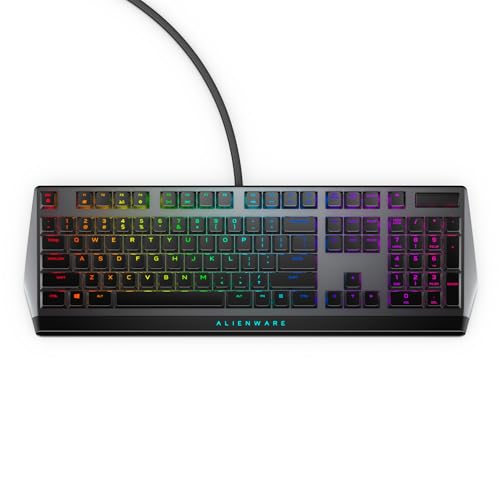
  3. Alienware Low-Profile RGB Keyboard AW510K

    Pick 3Low-Profile Pro Gaming Keyboard

    Alienware Low-Profile RGB Keyboard AW510K

    Pros

    • Fast, smooth key actuation ideal for competitive gaming thanks to low-profile Cherry MX Red switches
    • Highly customizable per-key RGB lighting and macros with settings stored on-board

    Cons

    • Requires Alienware Command Center for full lighting and macro customization
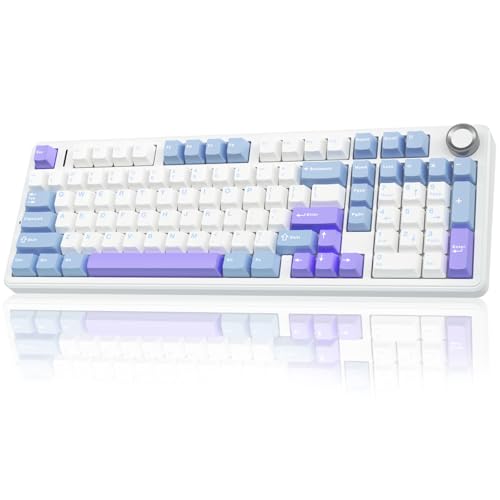
  4. AULA F99 Pro Wireless Mechanical Keyboard

    Pick 4Hot-Swappable Tri-Mode Wireless Keyboard

    AULA F99 Pro Wireless Mechanical Keyboard

    Pros

    • Versatile tri-mode and multi-device connectivity for work, gaming, and study
    • Hot-swap support and included tools make customization quick and solder-free

    Cons

    • The large 8000mAh battery and solid construction add weight — less ideal for ultra-portable use
  5. ASUS ROG Strix Scope II X Keyboard

    Pick 5Pre-Lubed Hot-Swappable Gaming Keyboard

    ASUS ROG Strix Scope II X Keyboard

    Pros

    • Pre-lubed, hot-swappable ROG NX Snow V2 switches deliver buttery linear action and quieter acoustics right away—ideal for gamers and typists who want premium feel without modding.
    • Full-size design plus dedicated media and Xbox Game Bar hotkeys give complete desktop functionality for gaming, streaming and productivity.

    Cons

    • Wired USB only — no built-in wireless option for mobile or clutter-free setups.
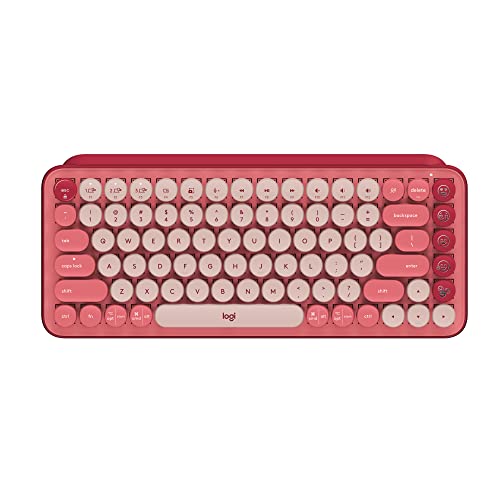
  6. Logitech POP Keys Wireless Keyboard

    Pick 6Customizable Emoji Mechanical Keyboard

    Logitech POP Keys Wireless Keyboard

    Pros

    • Expressive and fast — customizable emoji keys plus tactile mechanical switches make typing more fun and efficient
    • Flexible connectivity and endurance — multi-device Bluetooth or Logi Bolt support, long battery life and robust key durability

    Cons

    • Emoji-key customization requires Logitech Software and is supported only on Windows and macOS (not available on Linux or via mobile OS apps)

Compare the picks

The main reason to choose each pick, and the trade-off that comes with it.

Side-by-side comparison of the picks in this guide
PickStandoutTrade-off
Reliable always-on charging — stays powered by sunlight or indoor lightingNo wired connection option — Bluetooth only for wireless use
High-performance tactile, clicky switches for precise typing and responsive gamingClicky Green switches can be loud in shared or quiet environments
Fast, smooth key actuation ideal for competitive gaming thanks to low-profile Cherry MX Red switchesRequires Alienware Command Center for full lighting and macro customization
Versatile tri-mode and multi-device connectivity for work, gaming, and studyThe large 8000mAh battery and solid construction add weight — less ideal for ultra-portable use
Pre-lubed, hot-swappable ROG NX Snow V2 switches deliver buttery linear action and quieter acoustics right away—ideal for gamers and typists who want premium feel without modding.Wired USB only — no built-in wireless option for mobile or clutter-free setups.
Expressive and fast — customizable emoji keys plus tactile mechanical switches make typing more fun and efficientEmoji-key customization requires Logitech Software and is supported only on Windows and macOS (not available on Linux or via mobile OS apps)

Find your full-size keyboard

Data entry and accounting

A full-size keyboard with a numpad is the fastest layout for spreadsheets, accounting software, and large-volume numeric input.

Office typing

Choose tactile switches (MX Brown or equivalent) for comfortable, quiet typing in shared offices without sacrificing feedback.

Home office setup

Full-size suits desks where space is available. Wireless options keep the desk clean when used alongside multiple devices.

Gaming with numpad

Full-size keyboards work well for most gaming. The numpad shifts mouse placement slightly right — players needing wide sweeps may prefer TKL.

Quiet shared office

Silent linear or tactile mechanical switches produce less noise than clicky switches for open-plan desks and meetings.

Budget upgrade from membrane

Budget mechanical full-size keyboards with tactile or linear switches start around $40–$80 and outlast most membrane keyboards significantly.

Switch type guide

Switch typeFeelSoundBest for
Linear (e.g. MX Red)Smooth, consistent with no bumpQuiet to moderateData entry, gaming, fast typing
Tactile (e.g. MX Brown)Bump you can feel at actuation pointQuietOffice typing, mixed use
Clicky (e.g. MX Blue)Tactile bump plus audible clickLoudHome offices, typing focus
Silent LinearSmooth with sound-dampened pressVery quietOpen offices, quiet priority
MembraneSoft, no distinct actuation pointQuietBudget, shared desks, quiet priority

For compact layouts without a numpad, see the Compact and TKL Keyboard guide.

Should you buy full-size keyboards?

A good fit if you need

  • Anyone working in spreadsheets, accounting, or data entry — the numpad pays for itself daily
  • Shared family or office computers where familiar full-size layout matters
  • Users who want dedicated media keys and function rows without layered shortcuts

Look elsewhere if you need

  • Small desks where the mouse ends up shoulder-width away — a TKL layout fixes posture
  • Gamers who prioritize mousepad space over number entry

How these picks were chosen

Will Henschell researches each category from manufacturer specifications, retailer listings, owner-feedback patterns and published performance data, then narrows the field of full-size keyboards to a short list with a clear reason for each pick. Picks are labelled as research unless the page includes documented hands-on test notes. No brand pays to be included or ranked.

Picks are based on manufacturer specifications, comparison data, and verified owner feedback. No hands-on typing testing was performed.

Will Henschell

Researched and written by

What decided the ranking

  • Switch feel and actuation force for typing comfort
  • Wireless reliability and battery life where applicable
  • Build quality and keycap material — PBT vs ABS
  • Numpad layout and key spacing accuracy
  • Media controls and macro key availability

Sources reviewed

  • Manufacturer specifications and product pages
  • Retailer listing details and availability
  • Owner feedback patterns
  • Published expert or performance data, when it exists

Testing status

Sourced research. Nothing on this page is presented as hands-on tested unless test notes are shown.

Read the full methodology

The picks in detail

Pick 1Top pickSolar-Powered Full-Size Keyboard

Logitech Signature Slim Solar+ K980

By Logitech. Full listing name: Logitech Signature Slim Solar+ Wireless Bluetooth Keyboard K980

Logitech Signature Slim Solar+ Wireless Bluetooth Keyboard K980 (Graphite) — Full-size keyboard with number pad, powered by Logi LightCharge so it stays charged under solar or artificial light. Enjoy laptop-style typing across PCs, tablets and phones with instant Bluetooth pairing and seamless multi-device switching. Built to last up to 10 years of battery life and 10 million keystrokes, the K980 includes customizable Smart Actions via the Logi Options+ app for one‑tap automation. Sleek recycled-plastic construction, zero cables required, and broad OS compatibility (Windows, macOS, Chrome OS, Linux, iPadOS, iOS, Android).

Pros

  • Reliable always-on charging — stays powered by sunlight or indoor lighting
  • Full-size convenience with number pad boosts productivity for office and finance work
  • Long-lasting: up to 10 years battery life and high keystroke durability reduce replacement needs
  • Customizable shortcuts save time with one-key automation via Logi Options+
  • Seamless multi-device Bluetooth switching makes it easy to type across computer, tablet and phone
  • Eco-conscious construction uses recycled plastic

Cons

  • No wired connection option — Bluetooth only for wireless use
  • Single finish (Graphite) may limit aesthetic choices
  • While it charges from indoor light, prolonged very low-light conditions can slow charging times
  • May not offer specialized features preferred by competitive gamers (designed for productivity and comfort)

Key features

  • Always powered: charges from solar and artificial light with Logi LightCharge
  • Full-size layout with dedicated number pad for spreadsheets and data entry
  • Up to 10 years of battery life (under typical use) and 10 million keystroke durability
  • Customizable keys and Smart Actions using the Logi Options+ app
  • Wireless Bluetooth multi-device pairing and quick device switching
  • Works across Windows, macOS, Chrome OS, Linux, iPadOS, iOS and Android
  • No cables or charging cords required — ready to use out of the box
  • Sleek graphite finish and partly made with recycled plastic for an eco-friendly build

Pick 2Clicky Mechanical RGB Gaming Keyboard

Razer BlackWidow V3 Mechanical Keyboard

By Razer. Full listing name: Razer BlackWidow V3 Mechanical Gaming Keyboard: Green Mechanical Switches

Razer BlackWidow V3 Mechanical Gaming Keyboard — Green Mechanical Switches (Tactile & Clicky) with Razer Chroma RGB lighting in Quartz. This full-size keyboard delivers a compact form factor while retaining a dedicated number pad for both competitive gaming and everyday productivity. Engineered for satisfying feedback and optimized actuation, the Green mechanical switches provide crisp, tactile, clicky keystrokes and a rated 80 million keystroke lifespan. Transparent switch housings showcase deep Chroma RGB effects and dynamic in-game lighting for over 150 integrated titles. UV-coated ABS keycaps resist shine and wear, while the multi-function digital roller and media key make volume and playback control effortless. The sturdy, ergonomic wrist rest aligns with the keyboard for extended comfort, and built-in cable routing grooves keep your desktop tidy. Programmable macros and full RGB customization via Razer software unlock advanced play and workflow profiles. the BlackWidow V3 balances high-performance mechanical switches, durable construction and full-size convenience in a refined, compact package.

Pros

  • High-performance tactile, clicky switches for precise typing and responsive gaming
  • Vibrant Chroma RGB with clear switch housings for better lighting effects and immersion
  • Durable UV-coated keycaps and long switch lifespan for reliable longevity
  • Convenient media control with multifunction roller and comfortable wrist support
  • Full-size number pad retained in a space-efficient design

Cons

  • Clicky Green switches can be loud in shared or quiet environments
  • Advanced lighting and macro customization require Razer Synapse software; switches are not hot-swappable

Key features

  • Green mechanical switches — clicky, tactile feel with optimized actuation and reset points
  • Razer Chroma RGB with transparent switch housing — deep, customizable lighting and 150+ game integrations
  • UV-coated ABS keycaps — durable, wear-resistant finish
  • Multi-function digital roller & dedicated media key — quick volume and media control
  • Ergonomic wrist rest — sturdy support for longer sessions
  • Full-size layout with number pad in a compact form factor
  • Easy cable management grooves — route cable in any direction
  • 80 million keystroke lifespan — built for intense, regular use

Pick 3Low-Profile Pro Gaming Keyboard

Alienware Low-Profile RGB Keyboard AW510K

By Dell. Full listing name: Dell Alienware Low-Profile RGB Gaming Keyboard AW510K

Alienware AW510K Low-Profile RGB Gaming Keyboard is a full-size keyboard with number pad built for fast-paced, competitive play. Equipped with Cherry MX Low Profile Red switches for linear actuation and a shorter travel distance, the AW510K offers low actuation force and ultra-fast, smooth keystrokes to help you pick off opponents with precision. Its floating-key design mounted on a durable metal top plate supports full N-key rollover and a 100-million-keystroke lifecycle, while dedicated media controls and a USB passthrough add convenience for streaming and peripherals. Fully programmable keys plus on-board memory let you store macros and profiles that travel with the keyboard, and per-key AlienFX RGB lighting (16.8M colors) is customizable through Alienware Command Center for synchronized effects across compatible devices. Ideal for gamers who want a compact, full-featured mechanical experience in a low-profile form factor.

Pros

  • Fast, smooth key actuation ideal for competitive gaming thanks to low-profile Cherry MX Red switches
  • Highly customizable per-key RGB lighting and macros with settings stored on-board
  • Durable metal top plate and floating keys with full N-key rollover ensure reliable performance
  • Convenient media controls and USB passthrough streamline streaming and peripheral use

Cons

  • Requires Alienware Command Center for full lighting and macro customization
  • Low-profile linear switches may lack the tactile feedback some typists prefer
  • Priced above basic membrane keyboards—higher cost for premium mechanical components

Key features

  • Full-size layout with number pad and optimized three-section design for faster reactions
  • Cherry MX Low Profile Red switches — linear actuation, low force, shorter travel
  • Per-key AlienFX RGB backlighting with 16.8 million colors via Alienware Command Center
  • Full N-key rollover and anti-ghosting for accurate simultaneous key presses
  • On-board memory for saved macros, key assignments and lighting profiles
  • Floating keycaps mounted on a metal top plate for durability and modern aesthetics
  • Dedicated media controls and USB passthrough for convenience during play
  • 100 million keystroke lifecycle for long-lasting reliability

Pick 4Hot-Swappable Tri-Mode Wireless Keyboard

AULA F99 Pro Wireless Mechanical Keyboard

By AULA.

The AULA F99 Pro is a high-end wireless mechanical keyboard (96% full-size layout with number pad) built for gaming, productivity, and multi-device setups. the F99 Pro supports tri-mode connection (Bluetooth 5.0, 2.4GHz dongle, and USB-C) and can pair with up to five devices for instant switching. Its hot-swappable PCB accepts 3-pin and 5-pin switches so you can customize feel and sound without soldering; the included pre-lubed linear switches deliver a smooth, creamy typing experience. The advanced gasket structure, extended silicone pads, and five-layer silencer reduce cavity noise and improve key stability for a softer, more elastic keypress. A multifunctional knob switches between backlight and multimedia modes — rotate to change brightness or volume and press to toggle effects or play/pause. Customize macros, record keys, and explore 16.8 million RGB colors and music-synced lighting with the driver. Durable double-shot PBT keycaps resist wear while the massive 8000mAh battery ensures long runtime for extended gaming or work sessions. With full N-key rollover and compact 99-key layout, the AULA F99 Pro is ideal for users seeking a customizable, reliable full-size mechanical keyboard with modern wireless freedom.

Pros

  • Versatile tri-mode and multi-device connectivity for work, gaming, and study
  • Hot-swap support and included tools make customization quick and solder-free
  • Premium typing experience with gasket structure, pre-lubed switches, and creamy sound
  • Large 8000mAh battery enables long wireless use; robust PBT keycaps resist wear
  • Multifunction knob and full RGB/macro support add convenience and customization

Cons

  • The large 8000mAh battery and solid construction add weight — less ideal for ultra-portable use
  • Advanced lighting and macro functions require the driver for full customization

Key features

  • Tri-mode connectivity: Bluetooth 5.0, 2.4GHz wireless dongle, and USB-C wired for flexible, low-latency connections
  • Multi-device pairing: Connect up to five devices and switch between them with FN shortcuts or side button
  • Hot-swappable PCB: Easily swap 3-pin and 5-pin mechanical switches without soldering; keycap and switch pullers included
  • Multifunction control knob: Toggle backlight/multimedia modes, rotate for brightness/volume, click to change effects or play/pause
  • Gasket structure & five-layer silencer: Enhanced resilience, reduced cavity noise, softer and more elastic key feel
  • Pre-lubed linear switches: Smooth, creamy mechanical sound and fast response for gaming
  • RGB & macro support: 16 RGB effects, 16.8M colors, music rhythm lighting, macro recording and customization via driver
  • Durable PBT double-shot keycaps: Fade-resistant legends and solid textured feel

Pick 5Pre-Lubed Hot-Swappable Gaming Keyboard

ASUS ROG Strix Scope II X Keyboard

By ASUS. Full listing name: ASUS ROG Strix Scope II X Wired USB Mechanical Gaming Keyboard – 100%

ASUS ROG Strix Scope II X Wired USB Mechanical Gaming Keyboard delivers pro-grade performance in a 100% full-size layout with a dedicated number pad. Out of the box it ships with hot-swappable, pre-lubed ROG NX Snow V2 linear switches for buttery-smooth actuation and refined acoustics, plus durable PBT keycaps that resist shine. Integrated sound-dampening foam and pre-lubed stabilizers reduce ping and friction for more stable long-key presses, while the UV-coated ROG-themed spacebar with three underside RGB LEDs adds signature style. Intuitive multi-function controls and Xbox Game Bar hotkeys (F1–F5) let you manage media, recording and lighting without complicated key combos. Full RGB customization and native PC/Mac support make it easy to tailor lighting and layout. Premium mechanical feel and customization—.

Pros

  • Pre-lubed, hot-swappable ROG NX Snow V2 switches deliver buttery linear action and quieter acoustics right away—ideal for gamers and typists who want premium feel without modding.
  • Full-size design plus dedicated media and Xbox Game Bar hotkeys give complete desktop functionality for gaming, streaming and productivity.
  • Hot-swappable sockets let you try different switch types without soldering, making customization accessible to all users

Cons

  • Wired USB only — no built-in wireless option for mobile or clutter-free setups.
  • Hot-swap sockets use the ROG NX form factor; some non-standard switch types or rare third-party stems may require adapters or may not be compatible.

Key features

  • 100% full-size layout with dedicated number pad for productivity and gaming
  • Hot-swappable ROG NX Snow V2 linear switches — pre-lubed for smoother, quieter typing
  • Durable PBT keycaps that resist wear and maintain legends
  • Integrated sound-dampening foam to reduce ping and echoes
  • Pre-lubed stabilizers for smoother, more stable long-key presses
  • Multi-function button and multiwheel for easy media, volume and lighting control
  • Xbox Game Bar hotkeys (F1–F5) for one-touch access to recording and overlay features
  • Unique UV-coated ROG-themed spacebar with three underside RGB LEDs and full RGB backlighting

Pick 6Customizable Emoji Mechanical Keyboard

Logitech POP Keys Wireless Keyboard

By Logitech. Full listing name: Logitech POP Keys Mechanical Wireless Keyboard

Add color and personality to your desk with the Logitech POP Mechanical Wireless Keyboard — Heartbreaker Rose. This full-size keyboard with number pad delivers typewriter-style mechanical keys that click, clack and bounce for an addictive typing experience while keys are rated for up to 50 million strokes. Express yourself instantly using 8 swappable emoji keys plus an emoji menu key, all customizable via Logitech Software on Windows and macOS. Connect seamlessly via Bluetooth or the Logi Bolt USB receiver, pair with up to three devices and switch between them with Easy-Switch keys. Built to last and travel-ready, POP Keys offers a compact, space-saving design that supports better posture, a 3-year battery life and plastic components made with post-consumer recycled material — all in a striking Heartbreaker Rose finish.

Pros

  • Expressive and fast — customizable emoji keys plus tactile mechanical switches make typing more fun and efficient
  • Flexible connectivity and endurance — multi-device Bluetooth or Logi Bolt support, long battery life and robust key durability
  • Multi-device Easy-Switch lets you connect up to three devices and toggle between them with a single key press

Cons

  • Emoji-key customization requires Logitech Software and is supported only on Windows and macOS (not available on Linux or via mobile OS apps)
  • Logi Bolt USB receiver availability can vary by bundle — when sold as a keyboard-mouse combo the receiver may be stored in the mouse or packaging; verify included accessories

Key features

  • Full-size layout with dedicated number pad for spreadsheets and data entry
  • 8 swappable emoji keys + 1 emoji menu key, customizable via Logitech Software (Windows & macOS)
  • Typewriter-style mechanical switches with scooped keycaps — durable up to 50 million keystrokes
  • Dual wireless connectivity: Bluetooth or Logi Bolt USB receiver; pair up to 3 devices with Easy-Switch
  • Compatible with Windows, macOS, Chrome OS, Android, iPadOS and iOS
  • Long-lasting power with up to 3 years of battery life (typical usage)
  • Compact, space-saving design that encourages better shoulder positioning and posture
  • Includes certified post-consumer recycled plastic components (Heartbreaker Rose: 20%)

Full-size keyboard FAQ

Why choose a full-size keyboard over a TKL or compact layout?

Full-size keyboards include a dedicated number pad alongside the function row and all navigation keys. They are the right choice for data entry, accounting, financial software, and spreadsheet work where the numpad speeds numeric input. If desk space is not limited and you use the numpad daily, a full-size layout is worth it. For general typing or gaming without numpad need, a TKL or compact keyboard saves desk space.

Are mechanical keyboards better than membrane for office use?

Mechanical keyboards offer more precise actuation, tactile or audible feedback per keypress, and much longer lifespans — typically 50 to 100 million keystrokes versus 5 to 10 million for most membrane keyboards. For long typing sessions, mechanical switches provide consistent actuation force that can reduce finger fatigue. They are louder in shared offices unless you choose silent or tactile switch variants.

Which switch type is best for typing and data entry?

For long typing sessions, tactile switches (like Cherry MX Brown or equivalent) balance feedback and quiet operation. Linear switches (MX Red) are fast and smooth — well suited for rapid data entry with less resistance per key. Avoid clicky switches in open offices or shared spaces unless headphones are standard. Silent mechanical variants reduce noise significantly while keeping the mechanical feel.

Should I get a wired or wireless full-size keyboard?

Wired is more reliable for office desks — no charging required and no wireless interference. Wireless (2.4 GHz or Bluetooth) suits multi-device setups or cleaner desk arrangements and works well for most office tasks. Some keyboards support both wired and wireless modes. For a keyboard that stays on one desk all day, either works well; wired removes any battery concern entirely.

What is the difference between PBT and ABS keycaps?

PBT (polybutylene terephthalate) keycaps are more durable, resist the shine and slipperiness that develops from daily oil and friction, and maintain their texture after years of use. ABS (acrylonitrile butadiene styrene) keycaps are more common on budget keyboards and become shiny and slippery over time. PBT keycaps are worth prioritizing for any keyboard used daily.

Does a full-size keyboard work for gaming?

Yes. Full-size keyboards work for most gaming. Many PC gamers use full-size boards without any issues. The numpad does add width, requiring slightly more desk space between the keyboard and mouse. Players who need wide mouse sweeps at low sensitivity may prefer a TKL layout for more mouse room. Switch type and build quality affect gaming feel more than keyboard size does.

Browse more office gear