
Skip to content
Greatest Appliances

Best Compact and TKL Keyboards of 2026 for Gaming and Small Desks

Researched and compared compact and tenkeyless keyboards for gaming and desk-space efficiency — covering switch types, build quality, connectivity, and hot-swap support.

  1. Logitech G715 Wireless Gaming Keyboard

    Top pickLIGHTSPEED Wireless RGB TKL

    Logitech G715 Wireless Gaming Keyboard

    A strong choice for gamers who want tenkeyless efficiency with quality switches and reliable performance.

    Pros

    • Space-saving TKL design frees desk real estate and improves mouse movement
    • LIGHTSPEED wireless delivers low-latency performance comparable to wired
    • Per-key LIGHTSYNC RGB offers deep customization and preloaded animations

    Cons

    • Tenkeyless layout omits a numeric keypad—less ideal for heavy spreadsheet or data entry work
    • GX Brown tactile switches may not suit users who prefer linear or clicky switch profiles
  2. Corsair K70 PRO TKL Wired Keyboard

    Pick 2Per-Key Adjustable Actuation Keyboard

    Corsair K70 PRO TKL Wired Keyboard

    Pros

    • Extreme responsiveness and lower input latency thanks to Rapid Trigger, magnetic switches, and high polling rates
    • Fine-grain per-key tuning lets you optimize actuation for different games, macros, or play styles

    Cons

    • Tenkeyless layout omits a numeric keypad — less ideal for heavy productivity or data-entry workflows
  3. Logitech G PRO Mechanical Gaming Keyboard

    Pick 3Pro Esports TKL Mechanical Keyboard

    Logitech G PRO Mechanical Gaming Keyboard

    Switch Type
    Cherry MX Red
    Connectivity
    Wired
    RGB Lighting
    Yes

    Pros

    • Competition-grade performance and precise mechanical switches tailored for esports
    • Compact, travel-friendly TKL form factor frees desk space for bigger mouse movement

    Cons

    • GX Blue switches are clicky and can be noisy in shared or quiet environments
  4. Razer BlackWidow V4 TKL HyperSpeed

    Pick 4HyperSpeed Wireless Hot-Swap Keyboard

    Razer BlackWidow V4 TKL HyperSpeed

    Pros

    • Compact TKL design saves desk space and is ideal for small gaming setups
    • Hot-swappable sockets let you customize switch feel without soldering

    Cons

    • No numeric keypad — may not suit users who need a full-size layout
  5. AULA F75 Pro Wireless Mechanical Keyboard

    Pick 575% Hot-Swap Wireless Keyboard

    AULA F75 Pro Wireless Mechanical Keyboard

    Pros

    • Compact TKL design ideal for small desks and portable setups — great for compact TKL keyboards gaming small
    • Hot-swappable switches let you tailor the feel and sound without soldering

    Cons

    • 75% layout omits a dedicated numpad — not ideal if you rely on a full-size keyboard
  6. ASUS ROG Strix Scope TKL Electro Punk

    Pick 6FPS Precision 2X Ctrl Key

    ASUS ROG Strix Scope TKL Electro Punk

    Pros

    • Enhanced FPS performance — 2X wider Ctrl key reduces missed crouch/duck inputs for greater aiming precision
    • Compact, portable TKL form factor with premium Cherry MX Red switches and customizable RGB

    Cons

    • No dedicated numeric keypad (TKL layout) — not ideal if you rely on a numpad for productivity

Compare the picks

The main reason to choose each pick, and the trade-off that comes with it.

Side-by-side comparison of the picks in this guide
PickStandoutTrade-off
Space-saving TKL design frees desk real estate and improves mouse movementTenkeyless layout omits a numeric keypad—less ideal for heavy spreadsheet or data entry work
Extreme responsiveness and lower input latency thanks to Rapid Trigger, magnetic switches, and high polling ratesTenkeyless layout omits a numeric keypad — less ideal for heavy productivity or data-entry workflows
Competition-grade performance and precise mechanical switches tailored for esportsGX Blue switches are clicky and can be noisy in shared or quiet environments
Compact TKL design saves desk space and is ideal for small gaming setupsNo numeric keypad — may not suit users who need a full-size layout
Compact TKL design ideal for small desks and portable setups — great for compact TKL keyboards gaming small75% layout omits a dedicated numpad — not ideal if you rely on a full-size keyboard
Enhanced FPS performance — 2X wider Ctrl key reduces missed crouch/duck inputs for greater aiming precisionNo dedicated numeric keypad (TKL layout) — not ideal if you rely on a numpad for productivity

Find your compact keyboard

FPS gaming

Prioritize a wired TKL layout with linear switches for more mouse room and consistent low-latency keypresses in competitive games.

MMO and strategy

TKL or 75% keeps all F-keys for macro bindings. Tactile switches work well for frequent key combos and longer sessions.

Office and typing mix

TKL fits standard desk layouts. Choose tactile or silent linear switches for quieter shared-workspace use without losing feel.

Small desk setup

65% or 75% layouts save the most desk space. Ideal for minimal battlestations or compact work-from-home setups.

Switch experimenter

Look for hot-swap support so you can change switches without soldering as your preference for feel evolves.

Clean wireless desk

2.4 GHz wireless TKL keyboards offer near-wired performance without a cable crossing your desk or pad.

Switch type guide

Switch typeFeelSoundBest for
Linear (e.g. MX Red)Smooth, consistent press with no bumpQuiet to moderateGaming, fast typing
Tactile (e.g. MX Brown)Bump you can feel at actuation pointQuietMixed gaming and typing
Clicky (e.g. MX Blue)Tactile bump plus audible clickLoudTyping focus, solo use
Silent LinearSmooth with sound-dampened pressVery quietShared offices, quiet gaming

Keyboard layout comparison

Layout~KeysWhat's removedBest for
Full-size (100%)104NothingData entry, accounting, no space limit
TKL (80%)87Number padGaming, general office, smaller desks
75%~80Numpad, some key spacingCompact with F-row, tight desk setups
65%~68Numpad and F-rowMinimal desk space, gaming, portability

For full-size keyboards with number pads, see the Full-Size Keyboard guide.

How these picks were chosen

Will Henschell researches each category from manufacturer specifications, retailer listings, owner-feedback patterns and published performance data, then narrows the field of compact and TKL keyboards to a short list with a clear reason for each pick. Picks are labelled as research unless the page includes documented hands-on test notes. No brand pays to be included or ranked.

Picks are based on manufacturer specifications, comparison data, and verified owner feedback. No hands-on switch testing was performed.

Will Henschell

Researched and written by

What decided the ranking

  • Switch type and actuation feel — linear, tactile, and clicky compared
  • Hot-swap socket availability for switch customization without soldering
  • Build quality, case material, and key stability
  • Wireless connectivity and 2.4 GHz latency where applicable
  • Compact layout efficiency and key spacing

Sources reviewed

  • Manufacturer specifications and product pages
  • Retailer listing details and availability
  • Owner feedback patterns
  • Published expert or performance data, when it exists

Testing status

Sourced research. Nothing on this page is presented as hands-on tested unless test notes are shown.

Read the full methodology

The picks in detail

Pick 1Top pickLIGHTSPEED Wireless RGB TKL

Logitech G715 Wireless Gaming Keyboard

By Logitech. Full listing name: Logitech G715 Wireless Mechanical Gaming Keyboard

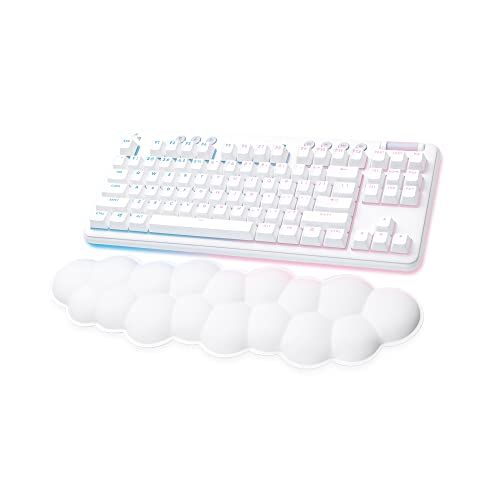
Logitech G715 Wireless Mechanical Gaming Keyboard (White Mist) is a compact TKL gaming keyboard that pairs ultra-responsive LIGHTSPEED wireless with per-key LIGHTSYNC RGB for a premium small-form-factor setup. Equipped with tactile GX Brown switches, a cloud-soft palm rest, and adjustable height, the G715 gives you satisfying, accurate keyfeel and all-day comfort. Play wired or wirelessly via LIGHTSPEED or Bluetooth, and enjoy up to 25 hours of rechargeable battery life with full lighting. Customize lighting and macros in G HUB, sync with other Aurora Collection gear, and save a USB port while keeping performance high—perfect for PC and Mac gamers who need a space-saving mechanical keyboard that looks as dreamy as it performs.

Pros

  • Space-saving TKL design frees desk real estate and improves mouse movement
  • LIGHTSPEED wireless delivers low-latency performance comparable to wired
  • Per-key LIGHTSYNC RGB offers deep customization and preloaded animations
  • Comfort-first palm rest reduces fatigue during long sessions
  • Versatile connectivity (LIGHTSPEED, Bluetooth, wired) for multi-device use
  • Solid tactile GX Brown switches provide a satisfying, responsive typing feel

Cons

  • Tenkeyless layout omits a numeric keypad—less ideal for heavy spreadsheet or data entry work
  • GX Brown tactile switches may not suit users who prefer linear or clicky switch profiles
  • Up to 25 hours with full lighting can require regular charging during heavy multi-day use
  • No dedicated macro column—advanced macro users may find fewer on-board key options

Key features

  • LIGHTSPEED ultra-responsive wireless + Bluetooth dual connectivity
  • Per-key and perimeter LIGHTSYNC RGB with Aurora Play Mood animations
  • Compact tenkeyless (TKL) layout for small desks and better mouse space
  • GX Brown tactile mechanical switches for balanced feedback and gaming control
  • Cloud-soft White Mist palm rest included for long-session comfort
  • Rechargeable battery up to 25 hours with full lighting (rechargeable)
  • Wired play option and full media controls at your fingertips
  • Customizable via Logitech G HUB; compatible with PC and Mac

Pick 2Per-Key Adjustable Actuation Keyboard

Corsair K70 PRO TKL Wired Keyboard

By Corsair. Full listing name: Corsair K70 PRO TKL RGB Tenkeyless Mechanical Wired Gaming Keyboard –

The Corsair K70 PRO TKL RGB is a compact, tenkeyless mechanical gaming keyboard engineered for speed, customization, and durability. Powered by pre-lubed CORSAIR MGX Hyperdrive magnetic (Hall Effect) switches and reinforced by a double-rail structure, the K70 PRO TKL delivers ultra-smooth, ultra-responsive keypresses rated for up to 150 million keystrokes. Rapid Trigger and ultra-fast polling rates reduce input latency, while per-key adjustable actuation (0.4mm–3.6mm in 0.1mm steps) and dual-actuation let you tune each key for lightning-fast commands and complex combos. The streamlined TKL layout frees desk space for sweeping mouse movement, and ABS double-shot keycaps with full RGB lighting complete a pro-focused package. Advanced features such as simultaneous SOCD support, QWERTY NA layout, and wired connectivity make this keyboard a top pick for competitive gamers seeking precision and speed.

Pros

  • Extreme responsiveness and lower input latency thanks to Rapid Trigger, magnetic switches, and high polling rates
  • Fine-grain per-key tuning lets you optimize actuation for different games, macros, or play styles
  • Compact TKL form factor frees desk space and improves mouse movement for FPS and competitive gaming
  • Durable, pre-lubed switches provide a smooth, consistent feel out of the box and long lifespan

Cons

  • Tenkeyless layout omits a numeric keypad — less ideal for heavy productivity or data-entry workflows
  • ABS double-shot keycaps can develop shine over long-term heavy use compared with PBT alternatives
  • Wired-only design limits portability and may be less convenient for some mixed-use setups

Key features

  • Per-key adjustable actuation from 0.4mm to 3.6mm in 0.1mm increments with dual actuation support
  • Pre-lubed CORSAIR MGX Hyperdrive magnetic (Hall Effect) switches with double-rail structure — rated for 150M keystrokes
  • Rapid Trigger technology and ultra-fast polling rates for minimal input latency
  • Space-saving tenkeyless (TKL) layout ideal for competitive setups and larger mouse movement
  • ABS double-shot keycaps with full RGB backlighting and QWERTY NA layout
  • Simultaneous SOCD support, wired connection for stable performance; function/non-primary keys use CORSAIR MLX switches

Pick 3Pro Esports TKL Mechanical Keyboard

Logitech G PRO Mechanical Gaming Keyboard

By Logitech.

Logitech G PRO Mechanical Gaming Keyboard — ultra-portable tenkeyless (TKL) design built for esports athletes and competitive gamers. this compact gaming keyboard pairs durable GX Blue click switches for crisp tactile and audible feedback with LIGHTSYNC RGB lighting (16.8 million colors) and onboard memory for static lighting profiles when G HUB isn't available. The detachable three-pronged Micro USB cable (1.8 m) locks securely for travel, while the small form factor frees up desk space for wider mouse movement. Additional features include 3-step angle adjustment, rubber feet for stable, intense sessions, and F-key programmability through Logitech G HUB. Ideal for tournament-ready setups and players who need performance-grade precision in a travel-friendly package.

Pros

  • Competition-grade performance and precise mechanical switches tailored for esports
  • Compact, travel-friendly TKL form factor frees desk space for bigger mouse movement
  • Vibrant LIGHTSYNC RGB with onboard memory lets you keep lighting on locked systems
  • Secure detachable cable and robust build make it ideal for frequent transport

Cons

  • GX Blue switches are clicky and can be noisy in shared or quiet environments
  • Advanced programming and macro features require Logitech G HUB; tournament rules may restrict macros

Published specs

Switch Type
Cherry MX Red
Connectivity
Wired
RGB Lighting
Yes
Hot-Swappable
No
Form Factor
TKL

Key features

  • Built with and for esports athletes for competition-level performance, speed and precision
  • Durable GX Blue Click mechanical switches with tactile, audible feedback
  • Ultra-portable tenkeyless (TKL) layout saves desk space and eases transport
  • LIGHTSYNC RGB backlighting with 16.8 million colors and onboard memory for static lighting
  • Detachable three-pronged Micro USB cable (1.8 m) for secure connection and easy packing
  • 3-step angle adjustment and rubber feet for added comfort and stability
  • F-key (F1–F12) programming and macro support via Logitech G HUB (software required)

Pick 4HyperSpeed Wireless Hot-Swap Keyboard

Razer BlackWidow V4 TKL HyperSpeed

By Razer. Full listing name: Razer BlackWidow V4 TKL HyperSpeed Wireless Hot Swappable Gaming Keyboard

Razer BlackWidow V4 TKL HyperSpeed Wireless Hot Swappable Gaming Keyboard — Orange Tactile Switches. this compact TKL gaming keyboard delivers pro-grade performance in a small form factor. Game lag-free on ultra-fast 2.4 GHz Razer HyperSpeed Wireless or pair and switch between three Bluetooth devices for seamless multitasking. Hot-swappable 3- or 5-pin sockets let you swap the pre-loaded orange tactile switches for any compatible switch to fine-tune feel and actuation. Built for an optimized typing experience, it uses a top-mounted stainless-steel plate, tape-enhanced PCB, lubricated stabilizers and two layers of sound-dampening foam for cleaner, quieter keypresses. A multi-function roller and three dedicated control buttons offer on-the-fly audio, media and battery control — all fully remappable. Powered by Razer Chroma RGB with brighter, even key lighting and over 16.8 million colors, plus dynamic game-integrated effects. Up to 980 hours of battery life and fast charging keep you in the action longer. Ideal for competitive gamers, streamers, and compact-desk setups who want wireless freedom, hot-swap customization and premium features in a small TKL package.

Pros

  • Compact TKL design saves desk space and is ideal for small gaming setups
  • Hot-swappable sockets let you customize switch feel without soldering
  • Extremely long battery life (up to 980 hours) with fast charging
  • Low-latency HyperSpeed Wireless plus Bluetooth multi-device convenience
  • Remappable roller and control buttons streamline media and system control
  • Vibrant per-key Razer Chroma RGB with broad game integration

Cons

  • No numeric keypad — may not suit users who need a full-size layout
  • Premium features and wireless tech push the price above entry-level budget boards
  • Some users may prefer quieter linear switches; orange tactiles can be audible
  • Customizing switches requires buying third-party switches separately

Key features

  • RAZER HYPERSPEED WIRELESS & BLUETOOTH — Ultra-fast 2.4 GHz wireless with multi-device support and 3-device Bluetooth switching
  • HOT-SWAPPABLE DESIGN — Socketed PCB compatible with 3- and 5-pin switches for easy customization
  • ORANGE TACTILE SWITCHES — Pre-loaded tactile switches for responsive, satisfying feedback
  • OPTIMIZED TYPING EXPERIENCE — Top-mounted stainless-steel plate, tape-enhanced PCB, lubricated stabilizers and dual sound-dampening foam
  • MULTI-FUNCTION ROLLER & 3 CONTROL BUTTONS — Remappable controls for audio, media and battery settings
  • UP TO 980 HR BATTERY LIFE — Long battery life in both HyperSpeed Wireless and Bluetooth modes with fast charging
  • RAZER CHROMA RGB — Per-key lighting with 16.8M colors and dynamic game-integrated effects
  • COMPACT TKL FORM FACTOR — Small footprint for better mouse space and portable setups

Pick 575% Hot-Swap Wireless Keyboard

AULA F75 Pro Wireless Mechanical Keyboard

By AULA.

AULA F75 Pro Wireless Mechanical Keyboard — a high-value 75% hot-swappable compact TKL keyboard built for gaming and productivity. This 81-key mechanical gaming keyboard combines tri-mode connectivity (Bluetooth 5.0, 2.4GHz dongle, USB-C wired), a long-lasting 4000mAh rechargeable battery, and the convenience of connecting up to five devices with easy switching. The F75 Pro ships with pre-lubed LEOBOG Reaper switches and pre-lubed stabilizers for a smooth, thocky typing feel and fast game response. Hot-swap support for 3-pin and 5-pin switches makes customization simple—no soldering required. Designed for immersive play and compact setups, the keyboard features a multi-function knob for lighting and media control, 16.8 million RGB colors with 16 preset effects and music-sync modes (driver-enabled), and side-printed gradient black PBT keycaps that resist fading and sweat. Advanced internal damping—five layers of silencing and extended silicone pads—reduces cavity noise for a denser, more satisfying acoustic profile. Programmable keys, N-key rollover and WIN lock round out a professional-grade small gaming keyboard ideal for PC, laptops, tablets, consoles and mobile devices.

Pros

  • Compact TKL design ideal for small desks and portable setups — great for compact TKL keyboards gaming small
  • Hot-swappable switches let you tailor the feel and sound without soldering
  • Flexible tri-mode connectivity covers PC, console and mobile workflows
  • Pre-lubed switches & multi-layer damping deliver premium typing sound and stability
  • Full RGB customization plus a handy knob for on-the-fly control

Cons

  • 75% layout omits a dedicated numpad — not ideal if you rely on a full-size keyboard
  • Advanced lighting and macro customization requires driver/software (features may vary by OS)
  • Compact boards can have a steeper learning curve for users used to full-size layouts

Key features

  • 75% 81-key compact TKL layout — saves desk space while retaining arrow keys
  • Tri-mode connection: Bluetooth 5.0, 2.4GHz wireless, and USB-C wired (connect up to 5 devices)
  • Hot-swap PCB supports 3-pin & 5-pin switches for easy DIY customization
  • Pre-lubed LEOBOG Reaper switches and pre-lubed stabilizers for smooth, creamy typing
  • Multi-function control knob for quick volume/media or lighting control (switchable modes)
  • 16.8 million RGB backlight with 16 presets and music rhythm effects (driver supported)
  • Side-printed gradient black PBT keycaps — durable, sweat-proof and fade-resistant
  • 4000mAh rechargeable battery for extended wireless use

Pick 6FPS Precision 2X Ctrl Key

ASUS ROG Strix Scope TKL Electro Punk

By ASUS. Full listing name: ASUS ROG Strix Scope TKL Electro Punk Mechanical Gaming Keyboard

ASUS ROG Strix Scope TKL Electro Punk Mechanical Gaming Keyboard (Pink). Designed for serious FPS players, this compact tenkeyless keyboard pairs Cherry MX Red linear switches with a 2X wider Left Ctrl key for precision shooting and fewer missed inputs. The frameless TKL layout frees desktop space for mouse movement while the durable aluminum top plate and cyberpunk black-and-pink styling give it a premium look. Enjoy 100% anti-ghosting, onboard memory for profiles and macros, Aura Sync RGB lighting, a detachable USB-C cable, Quick-Toggle between FN and media controls, and a stealth F12 key to instantly hide apps and mute audio. Portable, responsive, and built for performance — the ROG Strix Scope TKL Elektro Punk is a purpose-built gaming keyboard for PC FPS players.

Pros

  • Enhanced FPS performance — 2X wider Ctrl key reduces missed crouch/duck inputs for greater aiming precision
  • Compact, portable TKL form factor with premium Cherry MX Red switches and customizable RGB
  • Dedicated stealth key instantly mutes audio and hides applications mid-game for quick privacy without interrupting play

Cons

  • No dedicated numeric keypad (TKL layout) — not ideal if you rely on a numpad for productivity
  • Wired-only design and linear switches may not suit users who prefer tactile feedback or wireless connectivity

Key features

  • 2X wider ergonomic Left CTRL key optimized for FPS precision and fewer missed inputs
  • German-made Cherry MX Red switches — smooth, responsive linear actuation for fast keystrokes
  • Tenkeyless (TKL) compact, frameless design maximizes mouse space and portability
  • Aura Sync RGB lighting with customizable effects and onboard memory for profiles
  • 100% anti-ghosting and N-key rollover for accurate multi-key detection
  • Detachable USB-C cable (Type-C) for easy transport; cable can double as a mobile charging cord
  • On-the-fly macro recording, Windows lock, Quick-Toggle between FN and media controls
  • Durable aluminum top plate with striking slash aesthetic and Electro Punk black-and-pink theme

Compact and TKL keyboard FAQ

What is a TKL keyboard and why is it popular for gaming?

TKL (tenkeyless) removes the number pad from a full-size keyboard layout, reducing total width by about 20%. This lets you move your mouse closer to the keyboard for a more natural elbow angle — useful in FPS and other games where wide, low-sensitivity mouse sweeps are common. TKL keyboards keep the function row, arrow keys, and all typing keys intact, so nothing is lost for everyday work.

What is the difference between a TKL, 65%, and 75% layout?

TKL (about 87 keys) keeps the full function row and arrow keys but removes the numpad. 65% (about 68 keys) goes smaller by also removing the function row, but keeps arrow keys. 75% (about 80 keys) keeps a compressed function row alongside arrow keys, splitting the difference. Choose TKL if you use F-keys daily; choose 65% or 75% if maximum desk space is the priority.

Which switch type should I choose for gaming?

Linear switches (like Cherry MX Red or Speed Silver) offer smooth, consistent keypresses with no tactile bump — preferred for fast-paced gaming. Tactile switches (MX Brown) add a feedback bump without a click sound, suiting mixed gaming and typing. Clicky switches (MX Blue) give audible and tactile feedback — popular for typing but loud in shared spaces. For gaming-first use, linear switches are the most widely recommended.

What is hot-swappable and do I need it?

Hot-swap sockets let you remove and replace mechanical switches without soldering. This means you can change switch feel or replace worn switches using a switch puller tool — no technical skill required. Hot-swap is not required for good performance, but it makes trying new switches easy and extends the useful life of the keyboard. It is worth having if you are undecided on switch type.

Should I get a wired or wireless TKL keyboard?

Wired remains the safest choice for competitive gaming — zero latency, no battery to manage, and consistent responsiveness. Modern 2.4 GHz wireless gaming keyboards have improved significantly and are near-wired in performance for most users. For casual and even many serious gamers, wireless is a practical and clean-desk choice. If you play games where milliseconds matter, wired is the safer option.

Does a TKL keyboard work for office typing?

Yes. TKL keyboards work well for office typing — the missing numpad does not affect standard typing, shortcuts, or document work. The function row and arrow keys remain intact. If you frequently enter numbers in spreadsheets or accounting software, a full-size keyboard with a numpad is faster. For general typing and programming, TKL is a practical everyday choice.

Browse more office gear